A drag-and-drop email editor for your app.
Custom blocks, full theming, merge tags, display conditions, language versions, and an AI assistant on your own model — all built into the SDK. Drop into any app with one init() call.
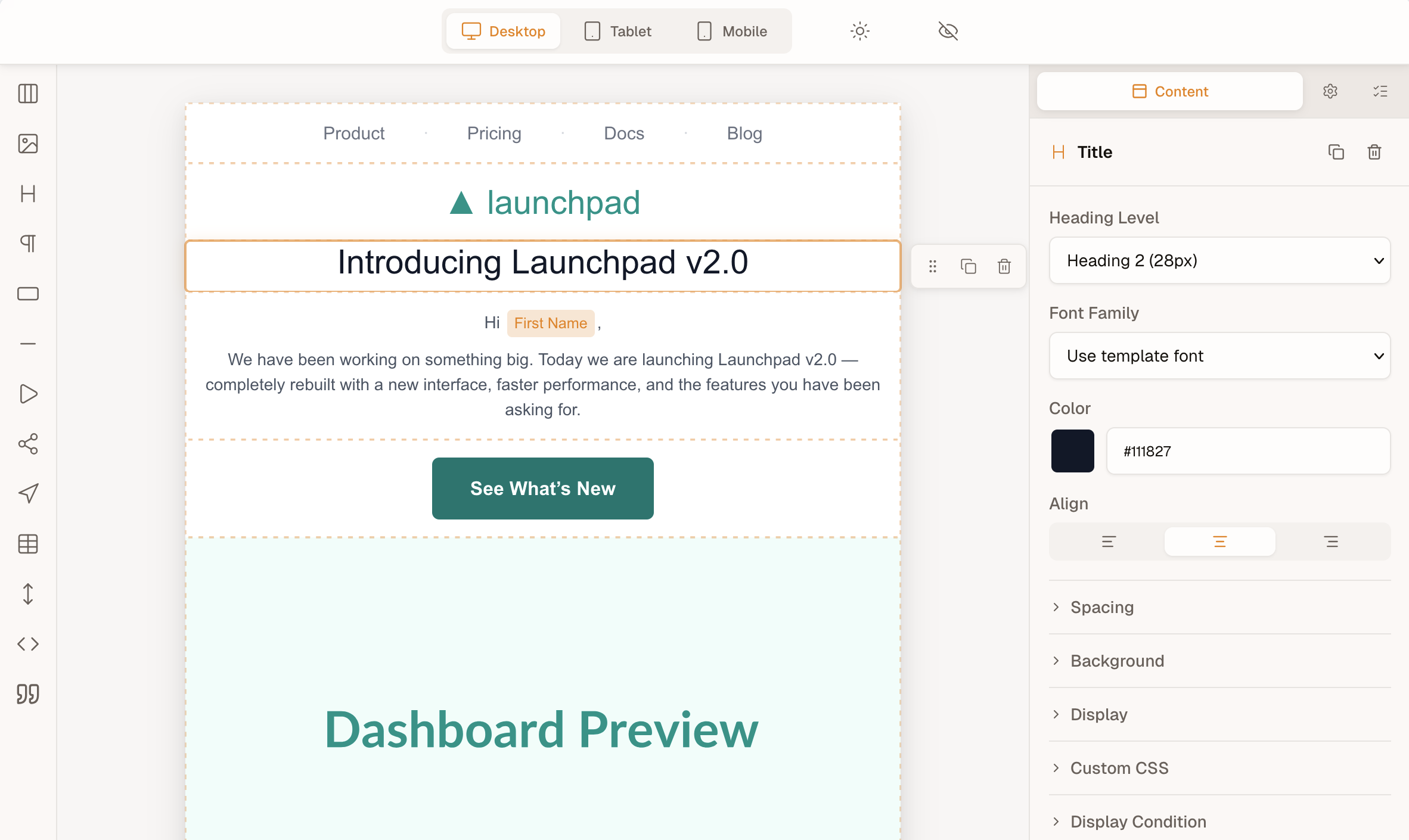
Works in React, Svelte, Angular, Vue, and vanilla JS — one init() call, zero runtime dependencies.
- TypeScript-first
- Built on MJML
- FSL-1.1-MIT (auto-MIT)
- Framework-neutral
- Shadow DOM
- No license key
- 254 kB initial · 479 kB lazy
AI in the editor, on your own model
Give init() an AI provider and the editor gets the AI assistant, Rewrite, Fix with AI and Write alt text. Your backend calls the model you choose, with your keys and your data-processing terms; the MIT AI kit supplies the wiring.
For your users
- AI assistantA chat that edits the template, one undo step per turn. It takes image and PDF attachments, and Import from screenshot or PDF starts an email from a design, with placeholders for pictures.
- RewriteShorten, expand, change the tone of, fix the grammar in or translate a paragraph from its toolbar, with a preview before anything is replaced.
- Fix with AIFixes lint findings such as vague link text or a missing preheader from the Issues panel, as one undo step.
- Write alt textDrafts alt text for one image or for every flagged image at once; nothing is written until you accept it.
Try the AI button in the editor above. Its replies are recorded, so no model runs on this page.
For your backend
import {
  createHttpAiProvider,
} from '@templatical/ai-kit/client'

const editor = await init({
  container: '#editor',
  templates: myTemplatesProvider,
  ai: createHttpAiProvider({ baseUrl: '/api/ai' }),
})- In the browser, createHttpAiProvider from @templatical/ai-kit/client talks to your backend over a documented REST and server-sent-events wire.
- On your server, the kit’s prompts, tool and editing loop run with createAnthropicAdapter, createOpenAiAdapter or createVercelAdapter; any other model plugs in through AiModelAdapter.
- Check it with the conformance suites and the eval set before you ship.
- The template, its merge tags and the prompts go to the model you call.
Describe the email. Or the integration.
One open-source Agent Skill, running entirely inside the coding agent you already use. Ask it for an email and it writes, imports, validates and previews a complete template. Ask it about the SDK and it mounts the editor in your app, scaffolds the code, or works out why an integration misbehaves. No backend, no API key, nothing sent to us.
“A product-launch email for an outdoors brand — hero image, a short intro, and a Shop now button in forest green.”
- build
- edit
- import
- validate
- export
- live
“Mount the editor in our Next.js admin, point save and load at our own API, and match it to our dark theme.”
- integrate
- scaffold
- diagnose
- docs
One command. It detects the agents you have installed and writes the skill into the folder each one reads — nothing is added to your project.
Prefer managed AI? Templatical Cloud adds in-editor AI chat and a hosted MCP server. Explore Cloud
Multilingual templates, translated through your own provider
Give init() a list of languages and authors add language versions of one email: a shared block tree, with each language’s text, property overrides and hidden blocks, and no provider needed. Add a translation provider, any object with a translate method, and Translate fills a version through DeepL, a translation management system or an LLM. The AI kit is optional.
Built in
- LanguagesAdd a language, make one the default or remove it. Every version shares the block tree; text, links, images and styling can differ, and a block can be hidden in one language.
- Language bar and badgesThe bar shows the version being edited with its missing and out-of-date counts. A badge on each block says Not translated, Out of date or Merge tags differ, with Keep and a reset to the default language beside it.
- Rendering and checksrenderToMjml(content, { locale }) renders one language, template-tools validate --locale reports missing and out-of-date text, and strings export and strings import exchange a language as JSON with a translation management system.
- Comments and AIEach comment records the language it was written in. With an AI provider, the AI assistant, Rewrite, Fix with AI and Write alt text edit the language on screen.
With localization alone: no provider, no backend, no extra package. The Beefree, Unlayer and Topol importers keep the source’s languages.
Translate with any service
const editor = await init({
  container: '#editor',
  localization: {
    locales: ['en', 'de', 'fr'],
    doNotTranslate: ['Acme'],
  },
  // Any object with translate(). Your backend
  // calls DeepL, a TMS or an LLM.
  translation: {
    async translate(request, signal) {
      const res = await fetch('/api/translate', {
        method: 'POST',
        headers: {
          'Content-Type': 'application/json',
        },
        body: JSON.stringify(request),
        signal,
      })
      if (!res.ok) throw new Error(res.statusText)
      return res.json() // { fields: [{ id, text }] }
    },
  },
})- Translate sends a version’s missing and out-of-date fields to your provider; your backend calls DeepL, a translation management system or an LLM, and returns the fields it translated.
- Merge tags, logic tags and your do-not-translate terms travel as numbered placeholders, and the editor applies a field only when every placeholder comes back.
- Subject lines aren’t part of the template: translate and store them in your own data. Keep every @templatical/* package on the same version.
Try it in the editor at the top of the page: open the language menu, choose Deutsch and run Translate from the language bar. The translations are recorded, so no translation service runs on this page.
Optional: the AI kit (MIT)
Ready-made pieces for the same interface, if your translator is an LLM or you want a tested HTTP route. Translate works without it.
createHttpTranslationProviderThe browser half of a documented HTTP route, POST /templates/{template}/translate.translateFieldsOn your server, runs the fields through any AiModelAdapter, checks every placeholder and repairs a failed field once.runTranslationConformanceChecks any provider, yours included, before you ship.createMockTranslationProviderRecorded answers for demos and tests; the editor at the top of this page uses it.
Everything you need, nothing paywalled
Building from scratch takes a quarter of engineering. SaaS builders charge per seat and gate the features that matter. Templatical includes them — source-available, self-hosted, ready to embed.
Build it yourself
Wire up an open-source web-builder framework with an MJML plugin, or compose React Email components yourself.
You’ll build yourself
- The editor UX itself — drag-and-drop, nesting, column splits, undo/redo
- Block-level merge tag scoping
- Display conditions with live preview
- Custom block SDK with API-backed data sources
- Editor-to-media-library glue — picker, image-block hook, replace flow
- A saved-block library — pick, name, preview, insert at position
- A test-send dialog — recipient picker, preview, sending and error states
- Preview resolution — real data in place of merge tags, without touching stored content
- Language versions — per-language text and overrides, fallbacks, out-of-date tracking and a translation round trip
- Dark-mode preview parity with sent email
- Theme tokens for brand consistency
- MJML output you can render anywhere
- Email-client compatibility — Outlook 2007–365, Gmail clipping, Apple Mail
- Accessibility — keyboard nav, ARIA, screen readers
- Style isolation — host CSS resets and design-system globals bleed into the editor
- Ongoing maintenance — every email-client tweak is a regression risk
Recommended — Templatical
A purpose-built, source-available email editor SDK. Own the experience, ship in days not quarters, never hit a paywall on core features.
Included in the SDK
- Custom blocks with API-backed data sources
- Block-level merge tags with scoping
- Display conditions for dynamic content
- Language versions in one template, filled by Translate through your own translation provider
- Pluggable media library — bring your own storage (S3, Cloudinary, your CMS)
- Saved blocks — users save block groups and reuse them, backed by your storage
- Saving and loading against your own storage — autosave, save status, Cmd/Ctrl+S
- Version history — browse, preview and restore, backed by your storage
- Threaded review comments anchored to blocks, on your storage and identities
- Real-time co-editing — ordered operations, block locks and presence, over your own backend
- Test sends from the editor, delivered by your own ESP and your domain
- Previews resolved by your backend — real data, logic branches evaluated
- Full theming via design tokens, dark mode included
- White-label by default — your UI, your brand
- MJML output — render in browser, on your server, anywhere
- Pre-send checks for accessibility, links, deliverability patterns (not inbox placement), and email-client compatibility, with suggested fixes and reference links
- AI assistant, Rewrite, Fix with AI and Write alt text — on your own model and keys
- Style-isolated — Shadow DOM mount keeps host CSS out
- No license key, no activation call — nothing we can switch off remotely
Coming with Templatical Cloud
In development- AI rewrite, AI chat, MCP integration
- Real-time collaboration with block-level locking
- Multi-tenancy and API access
SaaS builders
Drop in a hosted editor component pointing at a vendor’s rendering API.
Paywalled or restricted
- Custom blocks gated to higher paid tiers
- Display conditions gated to higher paid tiers
- Custom theming and design tokens on higher tiers
- White-label and brand removal on enterprise tiers
- Custom merge-tag syntax (Liquid, Handlebars) paywalled
- Template and block defaults gated to paid tiers
- Pluggable media library — locked to vendor’s storage
- Reusable saved blocks gated to paid tiers — even self-hosted
- Per-seat or per-end-user pricing scales with you
- Closed source — cannot audit, fork, or extend
- Output coupled to the vendor’s render API
- License key validated against the vendor’s servers — features enabled remotely by plan
- No CSS isolation — host styles can cascade into the embedded editor
Nothing to activate. Nothing to revoke.
No license key, no client ID, no activation call. The SDK never asks a server which features you are allowed to use — install it once and it keeps working, unchanged, including if this project disappears tomorrow.
- No license key or client ID anywhere in the API
- No entitlement check — features are never enabled or revoked remotely
- No telemetry, no analytics, no usage reporting
- Your templates stay in your app until you send them to your own backend
Ship an email editor this week
One npm install. One init() call. JSON in, MJML out — render anywhere, free.
import { init } from '@templatical/editor'
import '@templatical/editor/style.css'

// No API key, no client ID — this is the whole integration
const editor = await init({
  container: '#editor',
  onChange(content) {
    // JSON content — store, version, send anywhere
    console.log(content)
  },
})

const mjml = await editor.toMjml()